
An outstanding video player, with auto translation

MediaElement.js is a great HTML5 video player which falls back to identical Flash and Silverlight versions for older browsers. But, beyond that, it features a cool plug-in that not only can use the not-quite-yet-supported track element for subtitles, but also can translate them on the fly with Google Translate. Pretty nifty, I’d say!
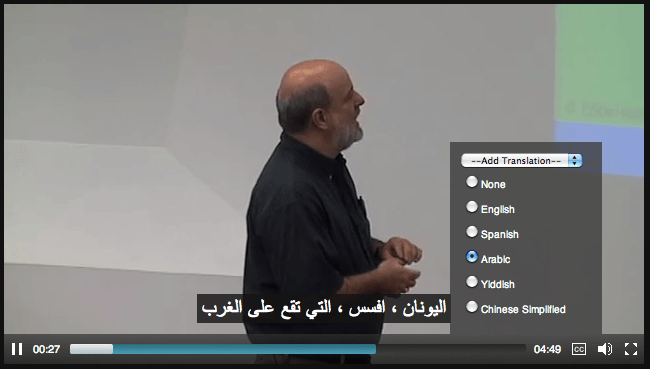
MediaElement.js with Auto Translation plug-in

2 thoughts on “An outstanding video player, with auto translation

  1. I had a very good experience customizing the UI for the MediaElement.js player on a recent client project.

    One unfortunate thing everyone should be aware of before they start working with MediaElement, though, is that when you’re in Flash or Silverlight fallback mode, both plugins have a security restriction that doesn’t allow you to send the plugin to full-screen mode directly from JavaScript. In the default MEJS player, the fullscreen button tells the SWF of XAP to reveal *another* “Go Fullscreen” button within the plugin instance. Depending on your UI design, you may be able to customize the Flash & Silverlight source to match the appearance and show/hide behavior of your DOM-based controls.

    This is not a criticism of MEJS, though, there really is nothing they can do about that security restriction in Flash & Silverlight.

    • Rob,
      Thanks for the kind words about MediaElement.js. Just wanted to let you know that MEjs’s fullscreen behavior has been changed for browsers that need the Flash/SL shim. Instead of the second button, it now uses the “full window” style that most HTML5 players use to bring consistency to the fullscreen experience.

Leave a Reply

Your email address will not be published. Required fields are marked *

You may use these HTML tags and attributes: <a href="" title=""> <abbr title=""> <acronym title=""> <b> <blockquote cite=""> <cite> <code> <del datetime=""> <em> <i> <q cite=""> <strike> <strong>