
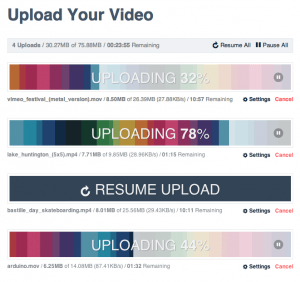
 Uploading in HTML has always left much to be desired from developers. With the introduction of the File and Drag-and-Drop APIs, we are beginning to see improvements across many sites whose core functionality relies on uploading. In this first of a series of tutorials on advanced uploading techniques, we will discuss reading file information and posting that up to a server. Of particular importance to this will be the concept of chunked uploading.
Why Chunked Uploading?
Uploading files which are only a few hundred kilobytes in one go is all fine and good on a standard connection, but what of mobile uploading? Or video files in excess of several gigabytes? As upload duration increases, so too does the possibility of failure. In the case of a failed upload, the user has no choice but to restart the upload from the very first byte. Not only does this cause aggravation for your users, but it also wastes resources on your upload machines. Chunked uploading by contrast, allows us to break a large file into small chunks, and send these pieces to the upload server one-by-one. If an upload fails, we need only resume from the last successful chunk.
This also gives access to another important concept: pausing and resuming uploads. In the case of uploading multiple files at once, this allows us to de-prioritize non-essential files. Another benefit is that we can pair our uploader with the Connection API to automatically halt the upload process if the user loses connection to their WiFi or mobile network. In short, we aim to make an uploader which is as resilient to failure as possible.
Getting the Files
Let’s begin by building the form which we will select our files from:
<form id="upload_form" action="/upload" method="post">
    <label for="file_input">Select Files:</label>
    <input id="file_input" type="file" multiple>
    <div>
        <input id="submit_btn" type="submit" value="Upload" disabled>
    </div>
</form>
<ul id="file_list" style="display: none;">
    <!-- File data will be listed here -->
</ul> |
This should all look very familiar with one addition: the multiple attribute. This new HTML5 feature allows us to select multiple files at once. Once the files are selected, we can access them using the File API:
$(document).ready(function() { var file_input = $('#file_input'), file_list = $('#file_list'), submit_btn = $('#submit_btn'), file_input.on('change', onFilesSelected); /** * Loops through the selected files, displays their file name and size * in the file list, and enables the submit button for uploading. */ function onFileSelected(e) { var files = e.target.files; for (var i = 0; i < files.length; i++) { file_list.append('<li>' + files[i].name + '(' + files[i].size.formatBytes() + ')</li>'); } file_list.show(); submit_btn.attr('disabled', false); } }); |
Important Note! The formatBytes() function is a utility method that is added to the Number prototype. Before we continue, here’s the code for that:
/** * Utility method to format bytes into the most logical magnitude (KB, MB, * or GB). */ Number.prototype.formatBytes = function() { var units = ['B', 'KB', 'MB', 'GB', 'TB'], bytes = this, i; for (i = 0; bytes >= 1024 && i < 4; i++) { bytes /= 1024; } return bytes.toFixed(2) + units[i]; } |
Uploading the Files
Brilliant! We’ve got our files selected, listed, and ready to upload. We are going to be making a lot of AJAX requests, so let’s first encapsulate those into a class that we will assign to each of our files.
function ChunkedUploader(file, options) { if (!this instanceof ChunkedUploader) { return new ChunkedUploader(file, options); } this.file = file; this.options = $.extend({ url: '/upload' }, options); this.file_size = this.file.size; this.chunk_size = (1024 * 100); // 100KB this.range_start = 0; this.range_end = this.chunk_size; if ('mozSlice' in this.file) { this.slice_method = 'mozSlice'; } else if ('webkitSlice' in this.file) { this.slice_method = 'webkitSlice'; } else { this.slice_method = 'slice'; } this.upload_request = new XMLHttpRequest(); this.upload_request.onload = this._onChunkComplete; } ChunkedUploader.prototype = { // Internal Methods __________________________________________________ _upload: function() { var self = this, chunk; // Slight timeout needed here (File read / AJAX readystate conflict?) setTimeout(function() { // Prevent range overflow if (self.range_end > self.file_size) { self.range_end = self.file_size; } chunk = self.file[self.slice_method](self.range_start, self.range_end); self.upload_request.open('PUT', self.options.url, true); self.upload_request.overrideMimeType('application/octet-stream'); if (self.range_start !== 0) { self.upload_request.setRequestHeader('Content-Range', 'bytes ' + self.range_start + '-' + self.range_end + '/' + self.file_size); } self.upload_request.send(chunk); // TODO // From the looks of things, jQuery expects a string or a map // to be assigned to the "data" option. We'll have to use // XMLHttpRequest object directly for now... /*$.ajax(self.options.url, { data: chunk, type: 'PUT', mimeType: 'application/octet-stream', headers: (self.range_start !== 0) ? { 'Content-Range': ('bytes ' + self.range_start + '-' + self.range_end + '/' + self.file_size) } : {}, success: self._onChunkComplete });*/ }, 20); }, // Event Handlers ____________________________________________________ _onChunkComplete: function() { // If the end range is already the same size as our file, we // can assume that our last chunk has been processed and exit // out of the function. if (this.range_end === this.file_size) { this._onUploadComplete(); return; } // Update our ranges this.range_start = this.range_end; this.range_end = this.range_start + this.chunk_size; // Continue as long as we aren't paused if (!this.is_paused) { this._upload(); } }, // Public Methods ____________________________________________________ start: function() { this._upload(); }, pause: function() { this.is_paused = true; }, resume: function() { this.is_paused = false; this._upload(); } }; |
Now that we have a class to handle the upload, let’s update our main script to construct a new ChunkedUploader instance when the file is selected. When the form is submitted, we will call the start() method on each ChunkedUploader instance. Now would also be a good time to prevent our actual form element from submitting as well:
$(document).ready(function() { var upload_form = $('#upload_form'), file_input = $('#file_input'), file_list = $('#file_list'), submit_btn = $('#submit_btn'), uploaders = []; file_input.on('change', onFilesSelected); upload_form.on('submit', onFormSubmit); /** * Loops through the selected files, displays their file name and size * in the file list, and enables the submit button for uploading. */ function onFilesSelected(e) { var files = e.target.files, file; for (var i = 0; i < files.length; i++) { file = files[i]; uploaders.push(new ChunkedUploader(file)); file_list.append('<li>' + file.name + '(' + file.size.formatBytes() + ')</li>'); } file_list.show(); submit_btn.attr('disabled', false); } /** * Loops through all known uploads and starts each upload * process, preventing default form submission. */ function onFormSubmit(e) { $.each(uploaders, function(i, uploader) { uploader.start(); }); // Prevent default form submission e.preventDefault(); } }); |
Pausing & Resuming
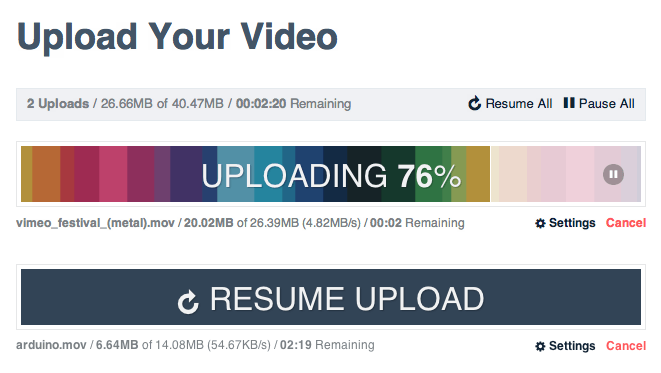
Files are getting read into our application and bytes and being sent out in tiny chunks over AJAX! Take a moment to stop and realize just how cool that really is! Amazing as it is, the end user still hasn’t seen any difference in their experience. So let’s add button wich allows them to pause and resume uploads. This will allow users to free up bandwidth if they need to complete another data-sensitive task, such as having a video chat on Skype or pwning some n00bz. When their chat/frag session is over, they can resume their upload where they left off without having to start the process over again. Onward!
First, let’s give each list item a pause button:
/** * Loops through the selected files, displays their file name and size * in the file list, and enables the submit button for uploading. */ function onFilesSelected(e) { var files = e.target.files, file, list_item, uploader; for (var i = 0; i < files.length; i++) { file = files[i]; uploader = new ChunkedUploader(file); uploaders.push(uploader); list_item = $('<li>' + file.name + '(' + file.size.formatBytes() + ') <button>Pause</button></li>').data('uploader', uploader); file_list.append(list_item); } file_list.show(); submit_btn.attr('disabled', false); } |
And now to add event listeners to each button that gets created:
file_list.find('button').live('click', onPauseClick); /** * Toggles pause method of the button's related uploader instance. */ function onPauseClick(e) { var btn = $(this), uploader = btn.parent('li').data('uploader'); if (btn.hasClass('paused')) { btn.removeClass('paused').text('Pause'); uploader.resume(); } else { btn.addClass('paused').text('Resume'); uploader.pause(); } } |
Next Steps
We’ve made big strides towards a more robust uploading system, but there is much left to do accomplish in terms of strengthening our upload class. In future tutorials we will be covering the following topics:
- Detecting loss of connection to automatically pause & resume
- Error handling
- Drag-and-drop uploading
- Server-side file handling