
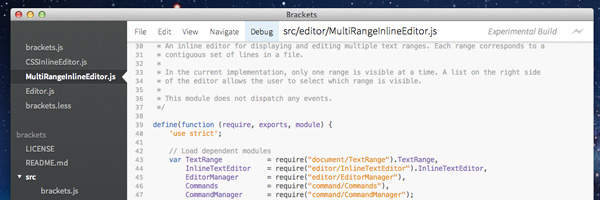
Recently, Adobe announced the initial (super beta) release of a public editor known as Brackets (not Adobe Brackets). In Adobe’s own words, Brackets is “a code editor for HTML, CSS and JavaScript that’s built in HTML, CSS and JavaScript.” Certainly not the first application to be implemented as such, but the fact that a company such as Adobe is putting it’s weight behind it and releasing it as open-source it quite an interesting play, indeed. I sat down with it for a session and made a list of pros and cons which I have expanded on in a more in-depth review below.
Pros
- Meta application—use Brackets to develop brackets! (“Yo dawg we heard you like JavaScript, so we made an editor in JavaScript so you can write JavaScript while you write JavaScript!”)
- Easily customizable
- Open Source
- Free?
Cons
- Still in very early beta
- Requires installation
- Lack of split-screen support
- Lack of full-screen support
- No support for 3rd-party plug-ins
- No auto-completion
Pros
Meta Application
This is one area where I feel that Brackets stands alone. It’s an application that allows you to build upon it using itself! How cool is that?
Easily customizable
Because Brackets is built using HTML5 and CSS, it is rather easy to perfect the IDE to your exact liking without having to scour Google for the perfect syntax highlighter or application skin.
Open Source
I’m not sure Adobe could have made it any easier to help develop and improve this platform. There is one small “gotcha” though:
Free?
So here’s the deal: Adobe has released this as open source, but under a modified version of the MIT license, which includes the following amendment:
Please note that some portions of this project are written by third parties
under different license terms. Your use of those portions are governed by
the license terms contained in the corresponding files.
Digging deeper, there’s a handful of other third-party libraries included in the project. The editor itself is driven by CodeMirror (which also powers JS Bin and JSHint). Also included in the source files is Twitter’s Bootstrap and LESS, both of which are licensed under Apache 2.0. Be on the lookout for other third-party libraries as they are added to the project (though I would wager that Adobe’s legal team is also keeping an eye on the GitHub repo).
Cons
Still in very early beta
In Adobe’s own words, “It’s still very early in development, is missing a lot of basic editor features, and probably has bugs.” In my opinion, Brackets is at something of a catch-22—it’s still early beta, but if you do feel kind enough to contribute to the project, it will move along as fast as the projects GitHub managers can take in new pull requests. Personally, I had a difficult time getting it to run on Lion—it took a few tries to launch (do this directly from the project folder—don’t try dragging the executable to your Applications folder).
There’s a handful of usability issues that appear which most will find rather quickly I feel. Clicking—and even double clicking—folders within a given project will not expand that folder. You actually have to click on the arrow icon.
Autocompletion is another area that is seriously lacking. I commend Adobe’s efforts to port an editor into and HTML/Javascript-driven environment, but really, this is the first feature that they should have developed.
The main menu is also a bit off—you have to click to open each application menu (“File”, “Edit”, “View”, “Navigate”, etc.). What’s more—these menus exist outside of the default OS menu system. If Adobe is going to keep requiring a wrapper application, these menus should be integrated into the OS.
Lastly, don’t bother right-clicking anything—there appears to be no existing context menu support.
Requires installation
One would assume that an editor built using HTML5 would be usable straight from a website (even if it does require a more modern browser with File API access), right? Unfortunately, that’s not the case. Brackets requires the use of a small native shell which wraps the entire application in order to access the local file system. Adobe links to a separate GitHub repo for this wrapper, but really they should just be linking to an installer. Allow me to save you the trouble: Click here to install Brackets.
Lack of split-screen support
Okay, so the TextMate has been lacking this for a while too. And you know what? That’s exactly why I now use Sublime Text 2 instead. Before switching entirely to Apple, I used to use Aptana as my editor of choice on Windows. While editing HTML, CSS, and JS files at the same time, this becomes something of a requirement and once you have it, it’s extremely hard to let go of.
Lack of full-screen support
Not to sound like a broken record, but Sublime Text’s “Distraction Free” mode is a god-send in a world of constant instant messages, e-mails, Twitter, and Tumblr updates. Full-screen capabilities would be a most-welcomed addition.
No support for 3rd-party plug-ins
The best features of editors like Aptana, Code, Textmate, and Sublime Text are the ability to extend the editor with features that apply to specific developers with specific workflows. Although one can make the argument that because Brackets is open-source, these features can be added, in which case, where is the line drawn in order to prevent Brackets from becoming bloated with hundreds of features that the majority of users don’t require? As developers, we must live with the fact that plug-ins aren’t meant for everyone and that there will always be some amount of customization required to integrate an editor into our workflow.
Wrap Up
Brackets definitely stands to become the wild card in the editor arena, especially so due to its potential to become one of the first (major) open source editors to the market. It has a long way to go, but if it gains enough critical mass from contributions from other developers, we could see this overtaking some of the more popular web editors, all of which currently seem to be vying for the #1 spot on their respective operating systems. Does Adobe’s dark horse have what it takes to come out on top?

Nice writeup. Couple of notes.
As you noted, Brackets is super early, and not really intended for general use. Basically, if you think you might be interested in hacking on it, then you should definitely check it out now. Otherwise, you might want to give it some more time.
On plugin / extensibility, the project team is actually adding the extensibility layer in right now, and you can begin to build extensions.
You can find more info on the wiki:
https://github.com/adobe/brackets/wiki
You can see a simple extension I created here:
https://github.com/mikechambers/StringConvert
Right now, binding to keyboard shortcuts and adding menu items is really hacking, but that is being improved as we speak.
Again, if you know JavaScript, HTML5 and CSS, then you should give brackets a serious look. Because it is built in those technologies, it is incredibly easy for anyone to contribute to the project (the project has already had quite a feweexternal contributions in the 2 weeks is has been public).
mike chambers
Thanks for chiming in, Mike! When you say that people interested in hacking on it should get in on it now, do you anticipate the policy of having the community contribute to this project will become more structured than pull requests on Github once we seeing more stable releases?
To the project’s credit, I see a lot of great back and forth on the existing pull requests in the repo!
Well, you can contribute in other ways other than just pull requests. i.e. help define features, write docs, test stuff, log bugs, etc…
Probably the best place to start is to check out the wiki, or join the mailing list. You can also hop into #brackets on irc.freenode.net.
Basically, how the project ends up being structured is ultimately up to those who dedicate time to it.
mike chambers
mesh@adobe.com
Thanks for the write-up Kevin. This might be our first “official” review of Brackets!
As Mike said, we’re still in the very early days. We wanted to start development in the open as early as possible, which meant releasing without a lot of “core” features. Because of this, you’ve probably noticed that we aren’t “marketing” Brackets broadly. Instead we are actively reaching out to the open source community to find contributors to help define and push Brackets forward.
I’m happy to say that most of the features you are missing are on our public backlog.
http://bit.ly/BracketsBacklog
The good news is that all of the features you’re missing are now on the backlog. In fact, many should be implemented by the fall. Some were already on our backlog (the others I added). We chose Trello for our public backlog because it will allow anyone to vote and comment on a feature. The core Brackets team practices scrum, so our priorities are constantly changing based on feedback, so please vote!
Here are the various links:
Code Completion
HTML – https://trello.com/c/vaI9IuIY
CSS – https://trello.com/c/yuUps6zu
JavaScript (Basic) – https://trello.com/c/h2LEe2ud
Advanced DOM – https://trello.com/c/awFhJZVZ
LESS – https://trello.com/c/iHMZSMi6
Split-View
Single Document – https://trello.com/c/GezHZcCx
Multiple Documents – https://trello.com/c/8YAFyAZD
Focus Mode (Full Screen) – https://trello.com/c/iYPwTK3u
Lion Full Screen – https://trello.com/c/v7ZlEPdN
As far as the installation goes, building on open web technologies means Brackets isn’t limited in where it can go. In fact, our early prototypes of Brackets worked exclusively in the browser. In speaking with JavaScript developers and modern web designers we found that many believed the future of web development was heading to the cloud/browser. However, the vast majority told us they weren’t quite ready for the cloud and wanted a traditional tool first. This year we plan to work on the core editor and focus on the desktop version. Beyond 1.0 we (the core Brackets team) have plans to take Brackets the cloud, allow for it to be embedded in web applications and even build tablet versions (a la PhoneGap). We want to supplement the traditionally installed local version with new targets, rather than ask people to give up what they know and love. We hope this will actually accelerate the move the cloud-based development. Personally, I’m very excited by the prospect of a hybrid model where I primarily develop locally (at work) but can log into a cloud version (at home) and my projects, settings and environment are waiting for me.
Again, thanks for the write up. We really appreciate the feedback.
Adam Lehman
Brackets Product Manager
I had a good play around with the beta, but I’m finding it fundamentally lacking in the key area that matters the most: the actual task of editing code. For me this is vitally important before any other feature such as code completion or LESS support. There was a noticeable “lag” when typing, only slight, but enough to be distracting. File loading / parsing speed also felt a little slow especially on large documents. Scrolling was also a bit slow, again especially in large source files. I struggled to find a friendly and FAST find function (especially across multiple project files) and I know it’s on the backlog but splitting the document window however you want is quite vital.
It seems to be like modern code editors such as Sublime 2 have this nailed. The experience of using multiple cursors with forward/backward selection seeking is just a thing of beauty. The really instant way you can record and playback macros with just a couple of key presses turns them into something genuinely useful. Scrolling is super fast, the mini-map document layout, the ctrl-r insight list, the very clever and fast completion lists (even though they’re not code based). I just think that nails the editing experience perfectly. It worries about making the actual task of writing and changing code faster, and wraps it up in a superbly fast native app as well. It understands that a few seconds shaved off loading,or ms shaved off scrolling, all adds-up.
Personally I value this above and beyond anything else. I just can’t be using an editor that feels like it’s struggling to keep up with my typing speed, which this (and for that matter most Eclipse based editors) do.
I find this to be quite a confusing move – I realise that the native app is only a stepping stone towards a totally cloud-based solution, but this takes away all the benefits of a JS text editor – that it runs in a browser. As a native app competing with OS optimised editors like TextMate and Sublime, any JS solution will feel comparatively unresponsive, and distinctly non-native.
I guess this benefit will return when when it goes totally cloud-based but then surely it’d be competing with Cloud9, http://c9.io/ the people that made CodeMirror?
I’d really like to see Adobe produce a native OS optimised text editor that feels at home on OSX. Not based on Eclipse or JS
Although they have tough competition in that space. Or maybe think about a web development tool that very closely matches that of the best practice of modern web developers.
Here is an excellent article and discussion from Jason Santa Maria that discusses the sort of tool that web designers need. http://v4.jasonsantamaria.com/articles/a-real-web-design-application/
This would be a great direction for Adobe, but if not, whoever nails this will clean up.
@Richard
Performance is by far the biggest obstacle when building on the open web stack. What you might have noticed from our backlog is that we’re very focused on solving the performance problem.
Brackets is about pushing the web platform and tooling forward in every way that we can. The performance problem isn’t going to be solved if we all just throw up our hands and say “native will always win”. We don’t believe this and if you look at the performance increases in JavaScript in just the past few years, JS is trending the right way.
Soon (this week) we will be sharing out performance metrics and how we stack up against native editors. At the moment, we are spending most of our time instrumenting Brackets so we can get baseline data. Once that is completed we (Brackets and the rest of the open web platform community) will start to solve the tougher problems around performance. To be honest, what our initial tests have shown is that it’s not actually JS that is producing the noticeable lag, but how the browser is repainting the screen.
So in short. Yes. Brackets isn’t as fast as the popular native editors today. We know it and we are going to solve it. I just ask that you remember that Brackets is an open source project in it’s infancy. So while we’re honored you would compare our few months of work to great products like TextMate and Sublime, I think it’s a bit too early to make definitive comparisons.
@Seb
We think the idea that anyone who posses the skills to *use* Brackets also posses the skills to *build* Brackets is pretty powerful. Running in the browser, in the cloud or on a device is just one of the many benefits to build on the open web platform. It’s not the only goal.
Clarification: Cloud9 is from the awesome team behind the ACE Editor (http://ace.ajax.org) not CodeMirror.
I’m *very* familiar with Jason’s article from two years ago. Really good stuff and I think it really captured what was needed in 2010. The problem with Jason’s article is that he’s stuck asking other people to build this perfect tool. With Brackets, the web development community can build this and not have to rely on a company like Adobe.
Adam Lehman
Brackets Product Manager
CodeMirror is a bit more mature than “a few months work”, and it’s the editor itself I was struggling to warm to. It’s nothing specific to Brackets I have issue with (c9.io has exactly the same problems listed above), it’s the very fact that an editor so inherently wrapped up in so many layers of browser stack will ever be fast enough to really replace native. It’s like all the quirky web based Photoshop clones. They’re fun for 5 minutes, but the moment you try to do some serious work you revert back to desktop because every millisecond counts.
I’ll keep checking back as the betas progress, but I suspect this is an uphill battle that relies on too many components outside of the sphere of “open source contributors” to really make a difference. Hacking new features into the editor sounds great, but re-coding the way the browser handles display repainting? That’s well outside the realm of the vast majority of developers. And if it’s at the core of performance bottlenecks already then more features are surely only going to compound this issue.
Yeah, on the performance front, there is a lot of work to be done (due in large part to building on the web stack). But, if we can solve that problem, that is something that will benefit everyone using that stack (and not just Brackets).
mike chambers
mesh@adobe.com
The *live coding* idea, especially for web front end development, is hot recently.
Another example is light table and my own LIVEditor project.
One similarity between LIVEditor and Adobe Brackets is that both of them try to bridge the gap between code editing and html preview/css inspection.
I blogged about it here: http://liveditor.com/blog/the-adobe-brackets-ide-project/